If you’ve ever struggled to manage content in the cluttered WordPress admin interface, SleekView might be the missing piece you didn’t know you needed.
Developed by the same team behind SleekWP, this plugin reimagines how creators, marketers, and developers interact with their data — giving you flexible Table, Kanban, and Feedback views that fit the way you work, not the other way around.
Most plugins create new post types or dashboards that separate you from your content. SleekView doesn’t.
Instead, it works with any post type — posts, pages, or custom ones — and simply visualizes them differently. This means no data lock-in, no complex migration, and no plugin-specific databases that hijack your workflow.
You can keep your content exactly where it is and just switch between views:
It’s the kind of flexibility WordPress has needed for years.
What makes SleekView more than just a visual plugin is its logic-driven foundation. The plugin features a Conditions System that allows you to define view rules using intuitive AND/OR logic.
For example, you can show different Kanban tabs based on user roles, or filter posts by taxonomy, date, or status. It’s a surprisingly powerful way to create tailored workspaces inside the familiar WordPress environment.
And because each view is fully interactive, you can add, move, edit, or delete items without reloading the page. It’s fast, seamless, and surprisingly satisfying to use.
SleekView doesn’t just stop in the admin dashboard. You can embed any of your custom views — tables, boards, or feedback lists — directly on the frontend via shortcode.
This makes it perfect for:
Essentially, it bridges backend organization with frontend visibility, a feature rarely done this elegantly in WordPress.
SleekView adapts to countless workflows. Here are some practical ways teams are using it:
Every example above uses existing post types — no data duplication, no extra setup. Just better visibility and control.
SleekView offers three flexible licenses:
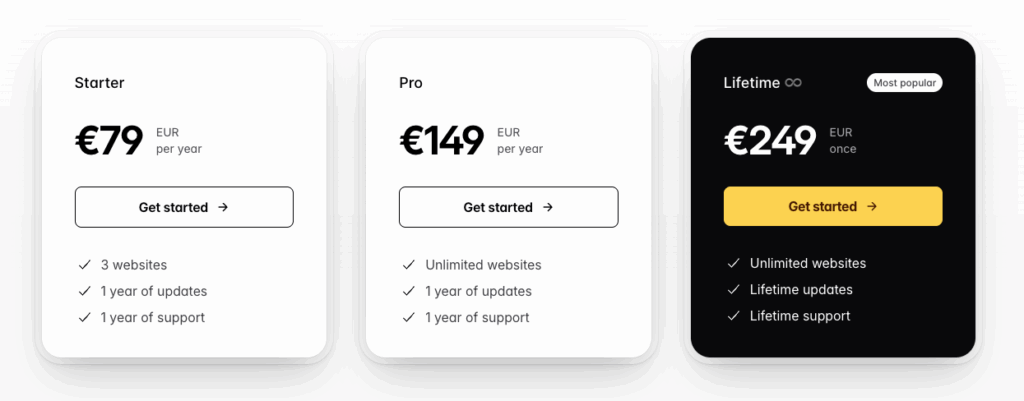
For those building multiple WordPress sites, the Lifetime Plan is a no-brainer, especially since it removes the need for yearly renewals.
Even better, SleekWP offers a Bundle Deal (€749) that includes SleekAI, SleekByte, SleekMotion, SleekPixel, and SleekView, giving you a complete suite for development, animation, optimization, and workflow automation — all under a single lifetime license.
SleekView is a workflow revolution inside WordPress. It transforms how you interact with your data, turning WordPress from a static CMS into a dynamic management platform.
The plugin’s biggest strength lies in its non-intrusive philosophy: it doesn’t replace your data, it just gives you better ways to work with it.
If your WordPress admin has ever felt like a spreadsheet graveyard, SleekView is worth a try.
With its lifetime license, you’re investing in efficiency, flexibility, and control.